
Lighthouse said 100. Google sees five words.
Lighthouse scored our React single-page app 100 for SEO. Not one URL, all of them. The sweep ran 40 URLs on mobile and desktop with Lighthouse 13.6.0, and every row in the CSV reads 100.
At the same time, Googlebot receives 13,900 bytes of HTML from every one of the 37 URLs in our sitemap. The same 13,900 bytes, whether the request is for the homepage or for a service page. Those bytes contain five words of text, and the five words are the title tag: Realize Profit - Digital Marketing Agency.
There is no h1 in there. No in-page link. No canonical tag. No meta description. No structured data.
This is a React SPA SEO failure that no audit score shows you, and both measurements are correct, which is what makes it worth writing down. The two numbers together are the whole argument: the SEO score measures signals, not the presence of content. It can tell you whether a page declares itself properly. It can't tell you whether the crawler received a page at all.
What Lighthouse's SEO category actually checks
Lighthouse opens your URL in Chrome, waits for the page to settle, and runs a short list of presence checks against the DOM it finds. Is there a title, and is it more than a URL? Is there a meta description, and is it long enough? Does the robots meta tag permit indexing? Do images carry alt attributes? Do links use real href values rather than click handlers? Are tap targets large enough for a thumb? Are the canonical, hreflang and robots.txt values valid?
Our pages answered every one of those correctly, and they answered them after the JavaScript had run, in a browser, against a fully rendered page. That's the honest scope of the check, and it isn't a flaw in Lighthouse. A shell with the right tags, in the right order, hydrated into a good page, passes comfortably. Lighthouse is reporting on the page your users get. Nobody asked it to report on the file your server sends, and it doesn't.
The shell in full
This is the entire body of every page on the site as it arrives over HTTP:
<body>
  <noscript>
    <iframe src="https://www.googletagmanager.com/ns.html?id=GTM-NX9XVXSM"
      height="0" width="0" style="display:none;visibility:hidden"></iframe>
  </noscript>
  <div id="root"></div>
</body>
The head carries a charset, a viewport, the generic title, a Google Fonts preload, an inline @font-face block, favicons, the module scripts and a Google Tag Manager snippet. The inline font block is longer than everything else in the document combined. There is no <noscript> fallback text, so a reader with JavaScript disabled gets a blank page.
The file isn't broken. It's a loader, and a loader is empty by design until the code arrives. The problem is that everything you want indexed sits on the far side of that arrival.
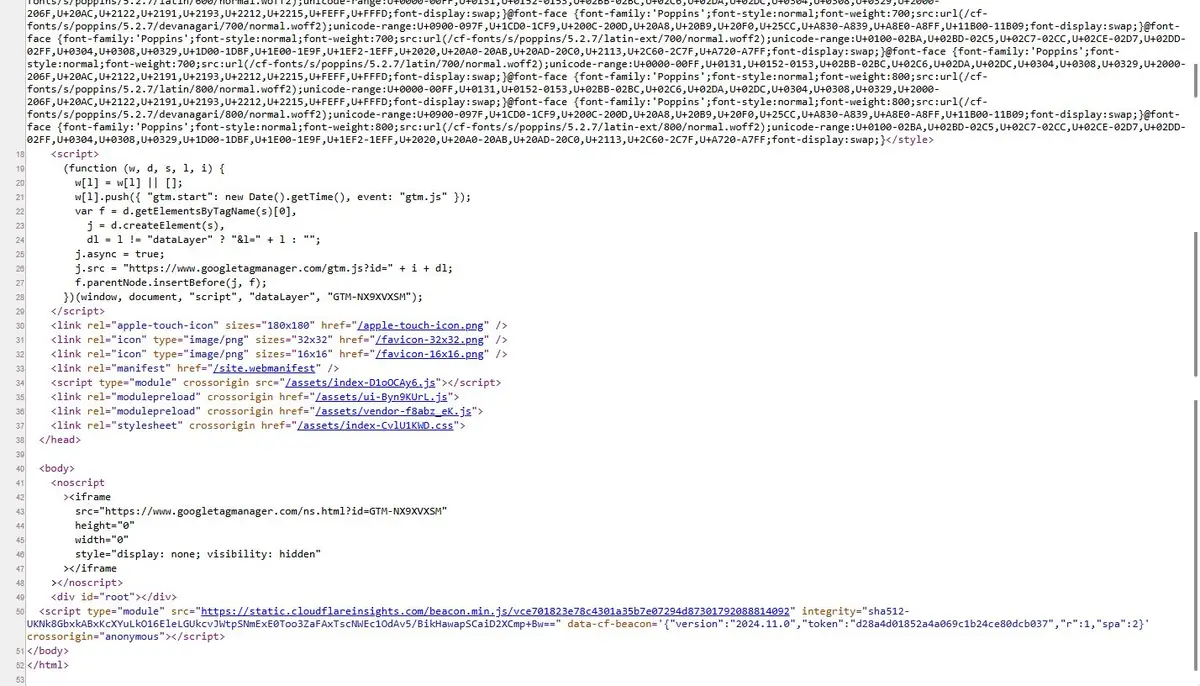
Raw view-source of a service page. Look for what is missing rather than what is there: no h1, no canonical link, no meta description, no JSON-LD. The head ends at line 38 and the entire body is a noscript block, a root div and one script. That is the whole document Googlebot receives.
The six crawlers that all got the same bytes
We fetched the same URL with six user agents: Googlebot, Bingbot, GPTBot, ClaudeBot, PerplexityBot and a current desktop Chrome build. All six responses were byte-identical.
One wrinkle, if you reproduce this. The byte count depends on what the client asks for. With Accept: text/html the response is 13,900 bytes; with no Accept header, or Accept: */*, it is 13,533. A bare curl sends the latter and gets the smaller number. The 367-byte difference is Cloudflare's own Insights beacon, injected on HTML navigations and absent otherwise — not a difference in our page. Both representations are the same shell: zero h1, zero in-page links, no canonical, no JSON-LD.
That rules out the explanations people reach for first. There's no cloaking bug, no bot wall or Cloudflare challenge turning Googlebot away, and no user-agent sniffing that accidentally serves the shell to robots only. A real browser got exactly what the crawler got.
The objection that follows is that Google executes JavaScript. It does, and our pages render well once it runs: 37 of 37 carry a unique title, a unique meta description, a self-referencing canonical and exactly one h1, and all 94 images carry alt text. If the rendered result were the only thing that mattered, this site would be in reasonable shape.
But a rendered page isn't the same thing as a page indexed from the first pass. At crawl time Google sees one document served 37 times, with five words of text and no links. There is nothing to distinguish a service page from the homepage, or from a junk URL, until a second system makes a second visit and runs the JavaScript. That deferral is where the site lives or dies, and it's also why "Google renders JavaScript" is true and unhelpful at the same time. The React SPA SEO problem is almost never that Google can't render. It's that rendering is a second chance, not a guarantee.
Crawl, render, index, and where a shell falls out
Google's own JavaScript SEO documentation describes three phases, and the sequence matters more than the labels.
Crawling is an HTTP request. Google fetches the URL, reads the response, and records what it can see in that response: the title, the meta tags, the links, the text.
Rendering is a separate pass in a headless browser. Google's documentation is explicit that rendering doesn't always happen at the moment of the crawl; pages can wait in a queue, and that queue is shared with the rest of the web rather than dedicated to your site.
Indexing is where the content is analysed and stored, and it works from the rendered result when one exists.
Our shell fails at each phase in a different way.
At crawl, there is nothing to record except one generic title repeated 37 times, and zero internal links. A crawler that doesn't run JavaScript finds no links in 37 documents, so the sitemap is the only way into the site. Every URL is discovered the same way and judged the same way.
At render, the page arrives, hydrates, and looks correct. The canonical appears, the h1 appears, the body copy appears. That is the good outcome, and it depends entirely on a second visit happening.
At index, the stored page is the rendered one, which is what you would want. What it has lost is history: a page that was never linked from another page at crawl time carries no evidence of being wanted anywhere.
Each phase is competent. The handover between them is where a document that says nothing loses, and no single metric in a Lighthouse report covers a handover.
The ten-second test that catches this
Run this against any route on your site:
curl -s https://yoursite.com | grep -o '<h1[^>]*>' | wc -l
If it prints 0, stop reading and go and look at your build. That's the whole diagnostic. It takes less time than opening Search Console.
The second test catches the shell specifically, because a shell is both empty and identical:
for u in / /about /services; do
  printf "%s " "$u"; curl -s "https://yoursite.com$u" | wc -c
done
Different pages returning the same byte count is the signature of one document served under many paths. On our site every one of the 37 sitemap URLs returned 13,900 bytes with an Accept: text/html header, and 13,533 without it — either way, the same number for every route.
The third check needs no terminal. In Chrome, View Source (Ctrl+U) shows the bytes the server sent. The Elements panel shows the DOM after JavaScript. Search the source for canonical, then for description, then for the first sentence of your h1. If the Elements panel has them and the source doesn't, you've found the gap between what you built and what a crawler can read. The view-source screenshot above is that gap, photographed.
If you're on Windows
Those commands don't run in PowerShell. grep and wc are Unix tools and Windows doesn't ship them, so the first one fails with grep: The term 'grep' is not recognized. The equivalents, tested on PowerShell 5.1 and 7:
# the h1 test
$h = curl.exe -s https://yoursite.com; [regex]::Matches($h,'<h1').Count

# the byte-count test across routes
'/', '/about', '/services' | ForEach-Object {
  $u = 'https://yoursite.com' + $_
  '{0} {1}' -f $_, ((curl.exe -s $u) -join [Environment]::NewLine).Length
}
Two things to watch. Use curl.exe, not curl — in PowerShell 5.1 bare curl is an alias for Invoke-WebRequest and won't accept -s. And the numbers won't exactly match a byte count from curl -w '%{size_download}', because joining lines back together normalises the line endings. You're comparing routes to each other, not to an absolute figure: identical numbers across different pages is the signal, whatever the units.
The fix for React SPA SEO: give each route its own HTML at build time
The fix for React SPA SEO isn't a new framework. Prerender the routes you already have. Run the router over your sitemap during the build and write a real index.html per route into dist/<route>/index.html, containing what React Helmet already produces at runtime: title, meta description, canonical, Open Graph, the h1, the body copy, the internal links, the JSON-LD. Then keep the existing bundle and let it hydrate over the top, so nothing about the interactive behaviour changes.
For a Vite build the tooling is not exotic. vite-plugin-ssr (now published as vike), react-snap, or a small Node script in the build step that walks the route table will all do it. The cheapest version that works is a build step, not a rewrite, and that distinction is the reason this is worth doing this week rather than next quarter.
The alternative, for routes that genuinely need per-request HTML, is rendering at the edge: the same component tree running in a Cloudflare Worker, composing the document per request. You keep request-time data and you take on a runtime to monitor, cache and debug.
The trade-off with prerendering is that content changes require a rebuild and a redeploy. For a 37-page marketing site that is closer to a feature than a cost, because it means the HTML and the content cannot drift apart.
Prerendering doesn't fix everything on its own. The same catch-all that serves the shell also answers HTTP 200 for paths that do not exist, including missing asset paths, so the site currently has no 404 status anywhere. Emit the prerendered files, then make the fallback return a real 404 for anything not in the route table. If you would rather hand the build work over, prerendering a static site is work we do, and the checklist is the same one in this article.
It isn't only Google
GPTBot received the identical shell in the same test, and so did ClaudeBot and PerplexityBot. Their published crawler documentation describes fetching pages rather than running a browser. That comes from the documentation, not from anything we measured, so check each vendor's current docs before you rely on it.
The practical consequence is easy to state. Ask an assistant which agency in your city does technical SEO and it can't quote your page, because the page as fetched contains five words and no list of services. It can't cite a canonical, because there's no canonical in the bytes. It can't follow your case studies, because there are no links.
If the document is a root div, the summary is a root div.
What it cost us
Ninety-two days of Search Console, from 11 August to 10 November 2026: zero clicks, 32 impressions, and 81 of those 92 days with no impression at all. One query cleared Google's reporting threshold, at seven impressions and zero clicks. The domain is absent from Common Crawl's host graph in the cc-main-2026-jan-feb-mar release, while the control domains in the same query were present.
That's what the shell bought us: not a penalty or a manual action, but a site with nothing to index, competing on a five-word title for every page it owns. Only five of the fourteen service pages appear in that Search Console table at all. Within those five, the terms of service ranked above all of them and the privacy policy above four. Boilerplate outranking the product is the pattern you get when Google will show your boilerplate and has no reason to show your product.
A 100 in Lighthouse is a real signal that a page is well-formed. It isn't evidence that a page exists, and it isn't evidence that anyone can find it. So before you spend money on links, audit your own site's raw HTML the way we audited ours. One curl and a byte count will tell you whether you have a rendering problem or an authority problem, and almost everyone guessing at this gets the order wrong.